




What Is a Warehouse Management System (WMS)?

Welcome to Manufacturing ERP 101 where you can fast track your understanding of ERP and assess its value to the continued success of your business.

What Is a Warehouse Management System (WMS)?
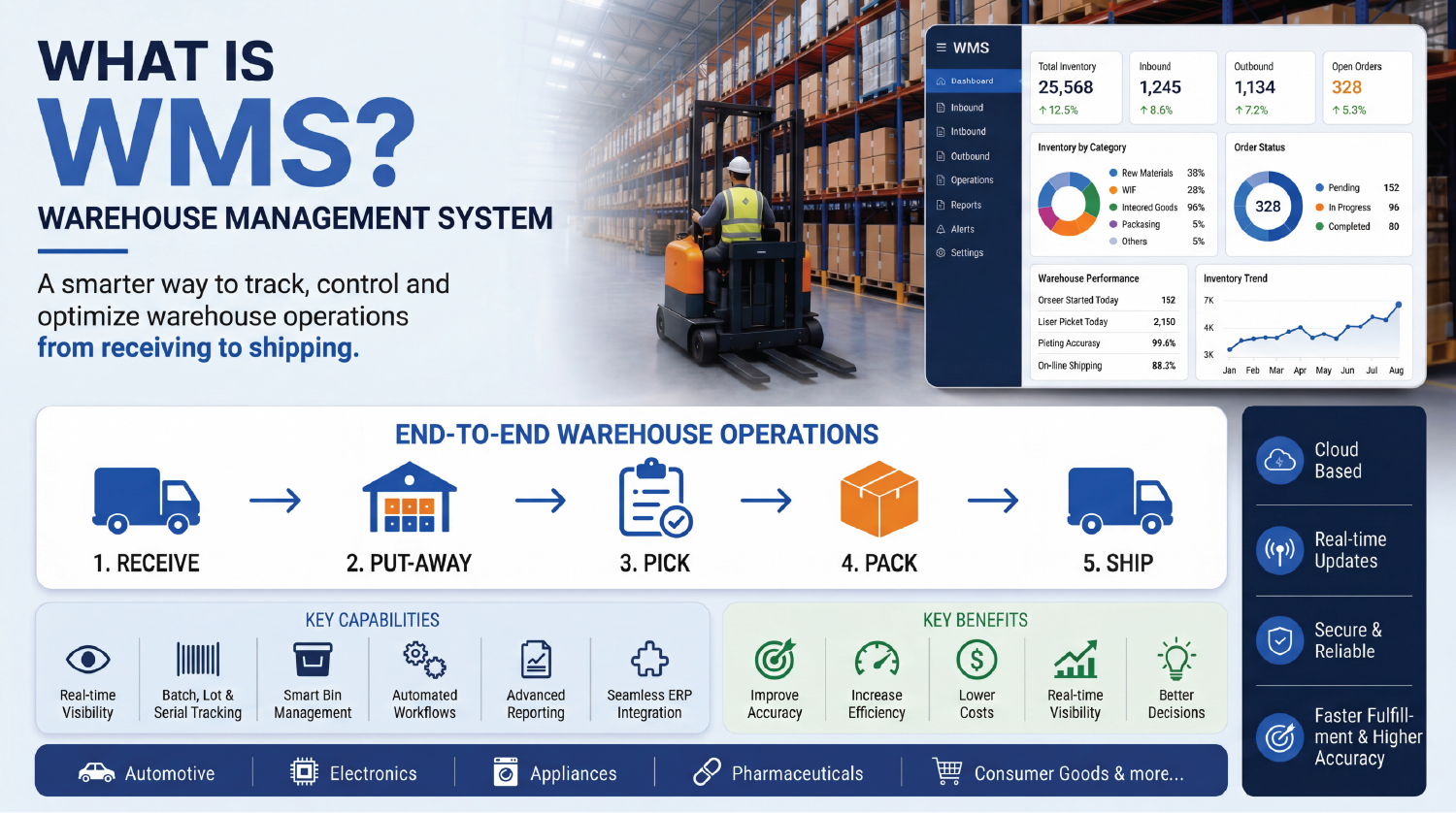
A WMS (Warehouse Management System) is an integrated solution designed to monitor and control warehouse operations, including storage, inbound logistics, order fulfilment, and distribution processes.
Did You Know?
In the 19th-century warehouse management became more prominent as railroads became widely used to transport goods, which needed to be tracked as they were stored and shipped. In the early 1970s, computer programs began to help with tracking the movement of goods and the technology continued to improve and evolve with more robust functionality that today’s systems now have.

What is WMS in Discrete Manufacturing? A Complete Warehouse Management System Definition
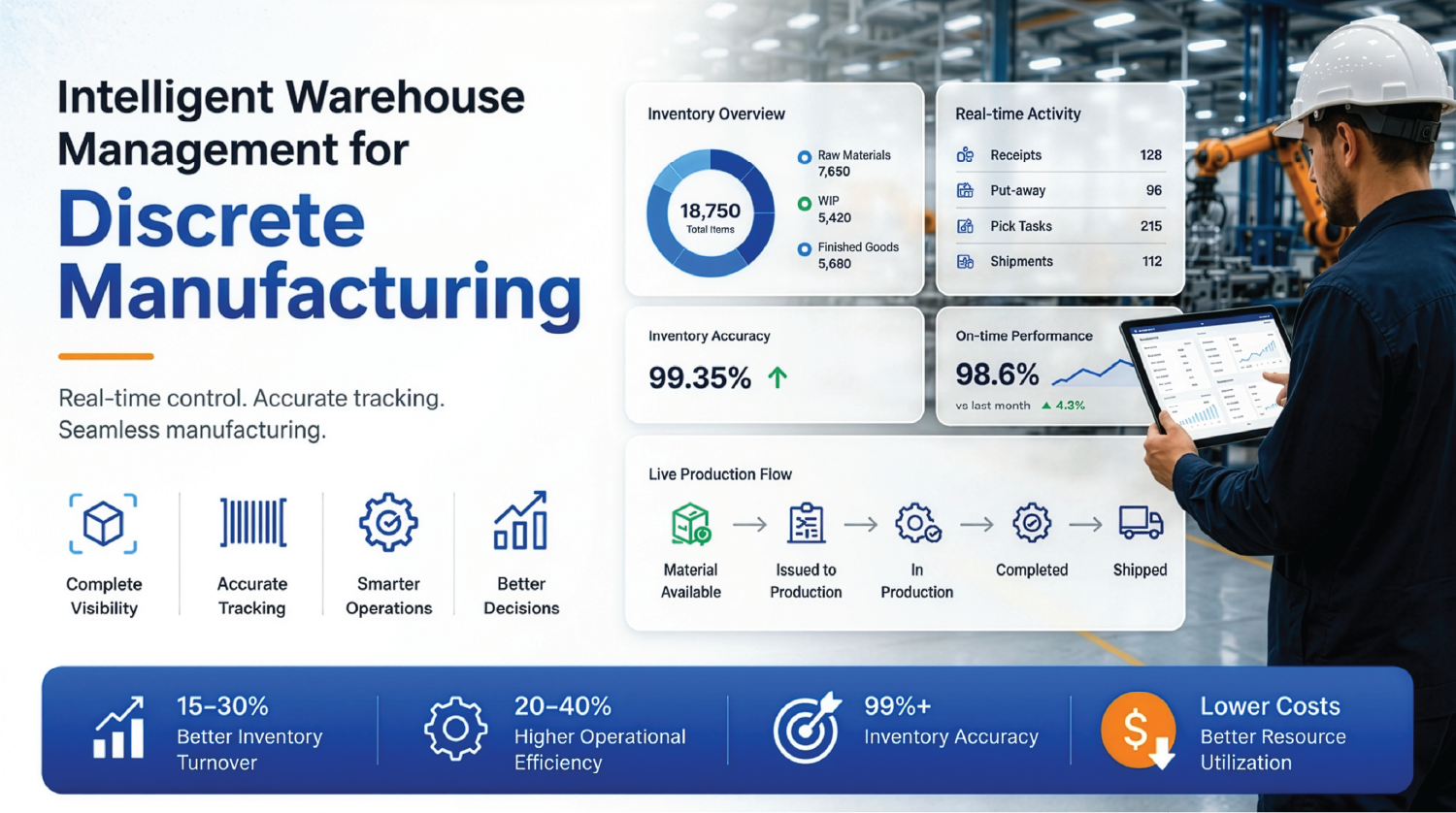
In discrete manufacturing, a Warehouse Management System (WMS) is an advanced solution that helps manufacturers handle inventory movement, trace materials, and manage all real stock production activities in real time across the entire manufacturing and distribution cycle.
In discrete manufacturing industries such as automotive, electronics, appliances, and similar sectors, products are manufactured as separate and distinct items composed of identifiable components and assemblies defined by BOM (Bill of Materials).

What are the Common ERP limitations in Warehouse Operations for Discrete Manufacturers?
An ERP system is limited to planning, finance, procurement, and production scheduling, but it does not handle the real-time tracking and traceability required for warehouse execution capabilities.
- Limited real-time inventory and stock tracking capabilities
- Delayed updates due to manual data entry processes
- Low picking efficiency and inefficient material flow
- Traditional ERP systems lack intelligent features such as guided picking and route optimization
- Higher chances of picking errors due to the absence of guided systems
- ERP systems lack advanced slotting and warehouse space optimization capabilities
- Limited integration with barcode scanners, RFID, and warehouse automation tools
- No intelligent task allocation for workers operating on the shop floor or in warehouses
- Workers are required to manually update stock movements and inventory transactions
- Managers face difficulties in making effective data-driven decisions
- Lack of predictive insights and optimization capabilities results in reactive rather than proactive operations
- Poor data synchronization leads to disconnected workflows across operations
- Lower customer satisfaction and increased operational costs
What are the Challenges faced by Manufacturers without WMS Integration?
- Lack of real-time inventory visibility for stock levels across bins, racks, and warehouse zones
- Production delays caused by slow material movement, resulting in reduced throughput, downtime, and missed deadlines
- Low inventory accuracy due to manual tracking processes
- Minimal coordination between warehouse and ERP operations
- Increased labor costs due to high manpower requirements for counting, sorting, and validation
- High training costs, as paper-based processes are difficult to standardize
- Poor compliance adherence, leading to audit failures and penalties for manufacturers
- Limited scalability, as managing multiple production lines becomes increasingly complex
- Lack of analytics resulting in inefficient decision-making processes
How Does WMS Enhance ERP Operations in Modern Manufacturing? Data-driven Perspective in Discrete Manufacturing
In modern discrete manufacturing industries, ERP (Enterprise Resource Planning) systems serve as the backbone for managing core business processes, while a Warehouse Management System (WMS) acts as the execution system for inventory and warehouse operations.
When ERP and WMS are integrated, they create a synchronized digital ecosystem within the organization that improves operational efficiency, reduces overall costs, enhances inventory visibility, and enables better business decision-making. WMS helps optimize storage allocation based on warehouse rules and inventory movement patterns.
It helps reduce manual errors and enables faster processing through barcode scanning, real-time system updates, and automated validations.
With the use of WMS, storage allocation is automatically optimized by assigning inventory to appropriate bins based on movement frequency, item type, and storage capacity. WMS utiliszes effective picking strategies such as wave picking, batch picking, and zone picking to improve warehouse efficiency.
Warehouse Management System vs. Inventory Management System – How are they Different?
A Warehouse Management System (WMS) and an Inventory Management System (IMS) are both primarily used for managing inventory and stock operations. However, the key difference lies in their functionality, operational depth, and overall scope.
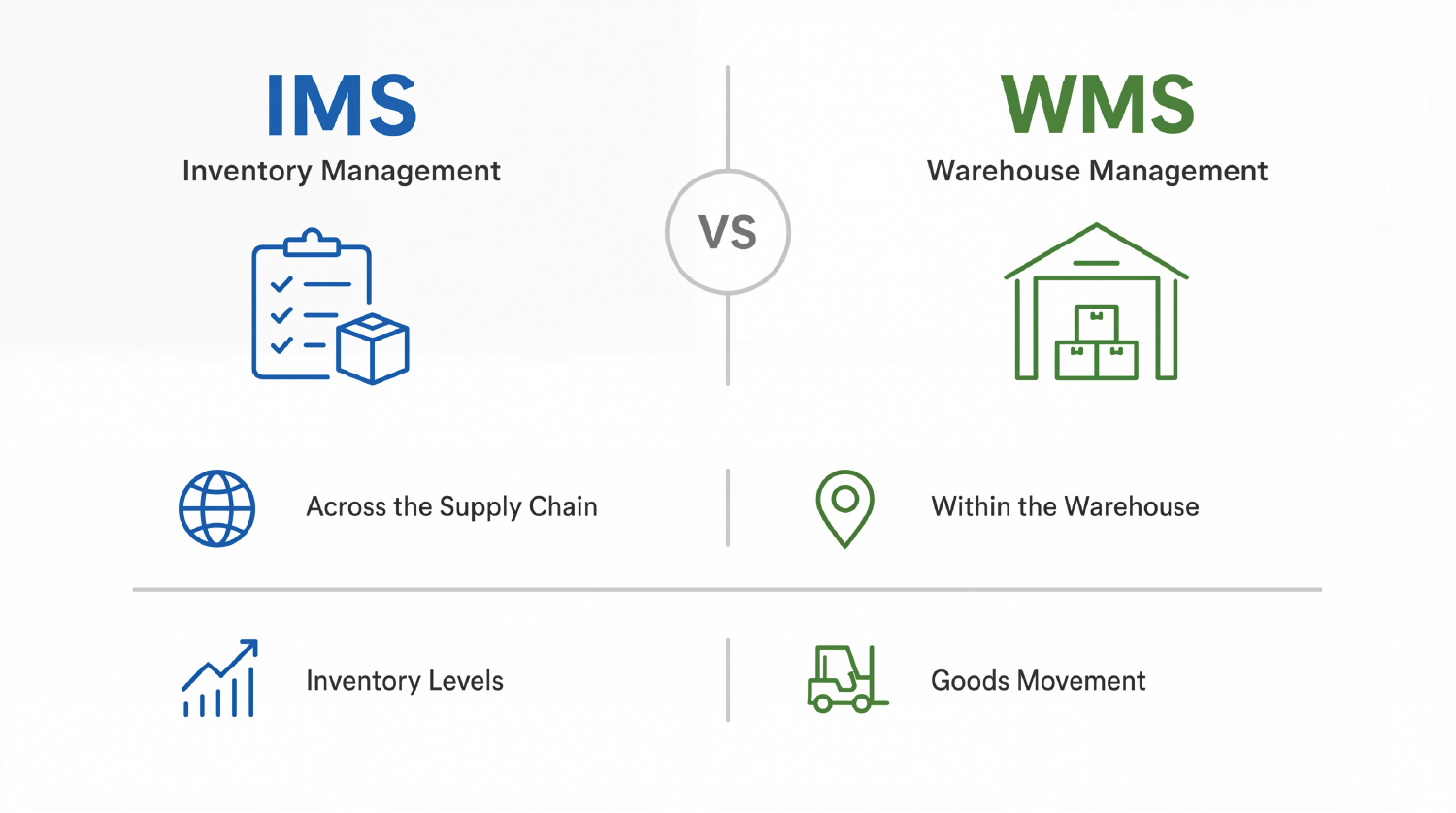
Let’s understand the comparison more clearly.
What is an Inventory Management System (IMS)?
The Inventory Management System focuses on tracking stock levels across multiple locations to help businesses maintain inventory visibility and accuracy. It is commonly used by e-commerce, retail, and small to medium-sized businesses.
What is a Warehouse Management System?
A Warehouse Management System (WMS) is an end-to-end solution designed to manage complete warehouse operations such as receiving, picking, packing, shipping, inventory transfers, and warehouse tracking. It is commonly used by large manufacturing operations, logistics companies, and distribution canters to improve warehouse efficiency and operational visibility.
Key Differences
| Feature | Inventory Management System (IMS) | Warehouse Management System (WMS) |
|---|---|---|
| Primary Focus | Primarily focuses on inventory quantity and stock value management | Focuses on warehouse efficiency, workflows, and operational processes |
| Scope | Handles basic stock movement and inventory tracking | Manages end-to-end warehouse operations, including receiving, picking, packing, and shipping |
| Stock Location Detail | General tracking at the store or warehouse level | Highly detailed tracking at bin, shelf, and rack level |
| Automation | Limited automation capabilities | Supports advanced automation such as barcode scanning, routing, and task automation |
| Complexity | Simple to moderate complexity | More advanced and operationally complex |
| Users | Commonly used by retailers and small businesses | Used by large warehouses, logistics companies, and distribution centres |
| Integration | Integrates with ERP, POS, and e-commerce platforms | Integrates with ERP, TMS, automation systems, and robotics |
How WMS Works (Step-by-Step Process Flow)
Step 1: Inbound Planning (Pre-Receiving)
The supplier sends an Advanced Shipping Notice (ASN) containing shipment details before the goods arrive. The WMS system then schedules dock appointments, prepares receiving resources, and pre-allocates storage space based on product type, quantity, and warehouse availability.
Step 2: Receiving Goods
The goods arrive at the warehouse, where warehouse staff scan the barcodes or RFID tags. The WMS system verifies the received items against the purchase orders or ASN details, and any discrepancies, such as damage, shortages, or excess quantities are automatically flagged. Once verified, the inventory is recorded as received but not yet stored in the warehouse locations.
Step 3: Quality Check (Optional but Common)
The items or goods then undergo inspection to ensure quality and compliance requirements are met. The WMS updates the inventory status as approved or rejected based on the inspection results. Approved items are moved to storage locations, while rejected items are either returned to the supplier or placed on hold for further review.
Step 4: Putaway (Storage Allocation)
The WMS then identifies the optimal storage location at the shelf, rack, or bin level based on rules such as:
- Product size and weight
- Demand frequency – fast-moving or slow-moving items
- Required storage conditions
Warehouse workers then follow a system-guided put away process using handheld devices. The outcome is accurate inventory storage with precise location mapping within the warehouse.
Step 5: Inventory Management & Tracking
The WMS system continuously tracks inventory at the bin level and supports functions such as cycle counts, stock adjustments, and real-time inventory updates. It also provides real-time availability visibility, while all inventory movements, including internal transfers, are automatically logged within the system.
Step 6: Order Management Integration
Orders are received from ERP systems, e-commerce platforms, or POS systems, and the WMS captures this order information in real time. The system then verifies and validates inventory availability, after which the orders are queued for fulfilment and warehouse processing.
Step 7: Picking (Order Fulfilment Begins)
The WMS system generates pick lists and optimized picking routes for warehouse operations. Different picking methods, such as single-order picking, batch picking, and zone picking, are used based on operational requirements. Warehouse workers scan items during the picking process to ensure accuracy, and the picked items are then transferred to the packing area for further processing.
Step 8: Packing
The items are then packed into boxes, and the WMS system recommends the appropriate packaging type and generates shipping labels automatically. The system also verifies order completeness through barcode scanning to ensure accurate packing before shipment.
Step 9: Shipping
The WMS system assigns the appropriate shipping carrier and delivery method, and automatically generates documents such as shipping labels, invoices, and packing slips. The system then updates the order status to shipped, and the outcome is that the goods successfully leave the warehouse for delivery.
Step 10: Dispatch & Tracking
The shipment is then handed over to the carrier, and the tracking information is automatically updated in the system. Through integrated systems, customers receive shipment notifications and real-time delivery tracking updates.
Step 11: Returns Management (Reverse Logistics)
Returned items are received and inspected, after which the WMS system determines whether the items should be restocked, repaired, or scrapped. The inventory records are then automatically updated based on the return status and disposition process.
WMS Implementation: Process, Timeline & Cost Considerations
The implementation of a Warehouse Management System (WMS) is a structured and multi-phase process that transforms the way warehouse operations are managed and executed.
A WMS implementation involves careful planning, system configuration, data preparation, testing, and deployment based on the specific operational needs and business requirements of the organization.
A step-by-step implementation approach is crucial because a WMS system directly impacts inventory accuracy, operational efficiency, and order fulfilment processes. Without a structured implementation process, organizations may face system disruptions, operational errors, inaccurate inventory data, and poor user adoption.
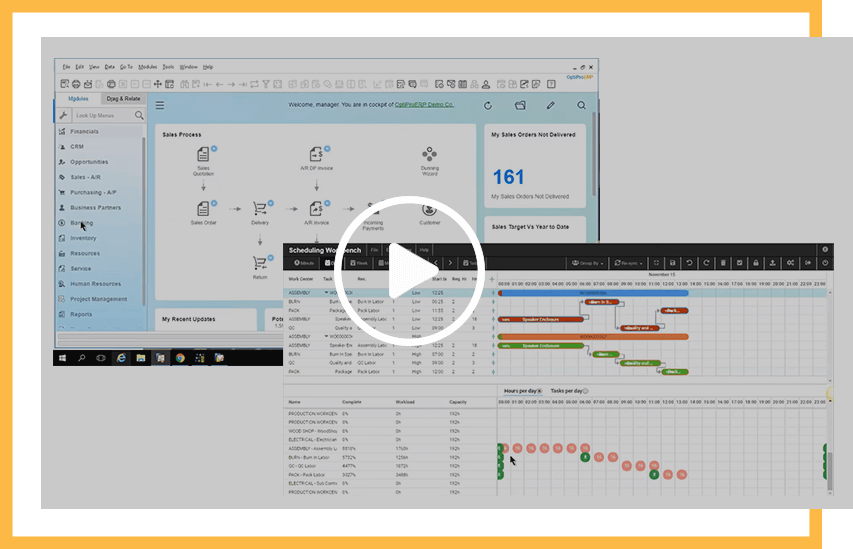
See ERP in Action
Learn how ERP software helps you ensure streamlined business operations.
The primary purpose of following a step-by-step WMS implementation process is to ensure the following:
- A smooth transition from legacy systems to an advanced warehouse management system
- Increased operational efficiency by minimizing errors, risks, and downtime
- Proper alignment of warehouse operations with business needs and workflows
- Improved inventory accuracy and order fulfilment performance
- Higher ROI (Return on Investment) through optimized warehouse operations and better resource utilization
Now, let us understand the WMS implementation process in a phased manner:
Phase 1: Planning and Requirements (2-4 weeks)
This phase begins with defining the business goals, scalability requirements, operational challenges, and efficiency expectations for the WMS implementation.
The AS-IS process is documented to understand the current state of warehouse operations, existing workflows, and limitations within the legacy or existing systems. This helps identify operational gaps, inefficiencies, and process bottlenecks.
Next, the TO-BE process is analysed and documented to define the future-state workflows and operational improvements required to overcome the gaps identified in the AS-IS assessment.
Detailed functional requirements are then documented for critical warehouse operations such as inventory tracking at the bin, lot, and serial number level, receiving, picking, packing, shipping, barcode scanning, and reporting requirements.
Finally, a dedicated project team is formed involving IT, warehouse operations, management stakeholders, and implementation/vendor teams to ensure smooth coordination throughout the project lifecycle.
Output
- High-level requirement document
- AS-IS and TO-BE process documentation
- Functional requirement specifications
- Project scope and implementation roadmap
Phase 2: Vendor Evaluation and Selection (3-6 weeks)
In this phase, WMS vendors are shortlisted based on business requirements, deployment preferences such as cloud or on-premise solutions, scalability needs, and operational complexity.
The evaluation process considers factors such as system features, integration capabilities, scalability, implementation support, and industry-specific suitability for sectors such as retail, pharmaceuticals, FMCG, manufacturing, logistics, and distribution.
Vendor demonstrations are conducted to evaluate system capabilities, workflows, user experience, and operational fit. In many cases, a Proof of Concept (POC) is also performed to validate how the WMS solution aligns with actual business processes and warehouse requirements.
After the evaluation is completed, the final vendor is selected, and discussions are finalized regarding pricing, implementation timelines, support models, and Service Level Agreements (SLAs).
Output
- Finalized WMS vendor selection
- Signed contract and commercial agreement
- Implementation roadmap and project plan
- Defined SLA and support structure
Phase 3: Solution Design (4-8 weeks)
In this phase, the workflows are configured for receiving, putaway, picking, packing, and shipping operations. The warehouse layout is defined in the system, including zones, racks, and bins. Business rules are configured for putaway and picking methods, and integrations are designed for the ERP system or APIs. The final output of this phase is the system design blueprint.
Phase 4: System Configuration & Customization (6-12 weeks)
In this phase, the WMS modules are configured, and the required custom features are developed. Barcode and RFID systems are also set up during this stage. Dashboards and reports are configured based on business requirements, and the final output is a fully configured WMS system ready for testing.
Phase 5: Data Migration (2-4 weeks)
Next comes the process of cleaning and validating the master data, such as SKUs, locations, and supplier information. The validated data is then uploaded into the WMS system, and its accuracy is verified to ensure consistency and reliability. The outcome is a WMS system populated with accurate real-time business data.
Phase 6: Testing (4-6 weeks)
This phase involves unit testing to verify individual WMS functions and processes. It also includes integration testing with connected systems such as ERP and shipping platforms to ensure smooth data flow and communication.
Later, the User Acceptance Testing (UAT) phase is conducted, where real warehouse scenarios are simulated to validate system performance, workflows, and operational accuracy. The outcome is a verified, stable, and deployment-ready WMS system.
Phase 7: Training & Change Management (2-3 weeks)
Once testing is completed, warehouse staff and supervisors are trained on the WMS system, including the use of handheld devices and barcode scanners. User manuals and SOPs are also created to provide operational and instructional guidance for staff members. During this phase, resistance to change is addressed through training and support initiatives. The outcome is a fully trained team prepared for a successful go-live.
Phase 8: Go Live & Deployment
In this phase, the deployment approach is finalized, which may include either a big bang implementation or a phased rollout strategy. Warehouse operations are closely monitored during the go-live process, and any bugs, issues, or system errors are resolved immediately to ensure smooth operational continuity. The outcome is a fully live and operational WMS system running successfully within the warehouse environment.
Phase 9: Post Go Live Support (Ongoing)
In the post-go-live support phase, the WMS system is continuously optimized and enhanced to improve user adoption and operational efficiency. System performance is regularly monitored, and necessary improvements and refinements are implemented to ensure long-term stability, scalability, and process improvement.
Typical WMS Implementation Timeline
The WMS implementation timeline is not specific to a particular factor, as it depends on multiple aspects such as the size of the business, complexity of warehouse operations, integration scope, and technical requirements.
For a small warehouse operation, the implementation may take approximately 2 to 4 months. For a medium-sized business, it may take around 4 to 8 months, whereas for a large enterprise-level implementation, the timeline may extend from 6 to 12 months depending on operational complexity and customization requirements.
Cost Considerations for the Warehouse Management System (WMS)
The costing of implementing a Warehouse Management System depends on various factors such as:
- Software Cost: The cost depends on whether the WMS is cloud-based with a subscription model or an on-premise solution requiring a one-time license investment. Cloud deployments usually involve recurring subscription costs, whereas on-premise systems require infrastructure and licensing investments.
- Implementation & Customization Cost: This depends on the level of customization, workflow configuration requirements, warehouse size, operational complexity, and setup considerations. The implementation cost may also vary geographically across different locations and labor rates.
- Hardware Cost: Hardware investments may include barcode scanners, RFID systems, handheld devices, label printers, network infrastructure, and servers for on-premise deployments. RFID systems generally involve higher implementation and infrastructure costs compared to barcode-based systems.
- Integration Cost: The implementation may require integration between the WMS and ERP systems, e-commerce platforms, shipping systems, automation systems, APIs, or other third-party business applications. The complexity of these integrations directly impacts the implementation cost.
- Training and Change Management Cost: Staff training is essential to ensure successful WMS adoption and operational efficiency. Training is often an ongoing activity, especially when system upgrades, workflow changes, or new operational processes are introduced. Change management efforts are also important to improve user adoption and reduce operational resistance.
- Ongoing Costs: Long-term operational costs include software maintenance, technical support, cloud subscriptions, system upgrades, infrastructure management, scalability enhancements, cybersecurity, and continuous optimization of warehouse operations.
How Optipro Manufacturing WMS Enhances ERP Operations for Discrete Manufacturers?
When a WMS is integrated with an ERP system, the performance of manufacturing operations improves significantly. Operations transition from a reactive approach to a more proactive and efficient state.
Real-Time Data Synchronization
- Real-time updates, where the ERP generates production orders and the WMS executes warehouse tasks such as picking, staging, and replenishment
- Improved coordination between planning and execution teams
- Elimination of data silos through real-time updates and continuous monitoring
Inventory Accuracy and Visibility
- RFID and barcode tracking can be effectively managed using WMS, as the system automatically captures inventory movements by scanning materials during receiving, storage, picking, and shipping activities.
- Real-time inventory visibility helps eliminate stock discrepancies, inventory mismatches, and duplicate entries, enabling production and procurement teams to make informed decisions based on current stock availability.
- Warehouse zone visibility and bin-level tracking help ERP systems access accurate and precise inventory location details, resulting in better planning and material allocation.
Optimized Production Flow
- WMS enables effective implementation of Just-in-Time (JIT) inventory management.
- It helps prevent production delays caused by missing or unavailable components.
- WMS ensures a continuous and efficient material flow across the entire production line.
- It reduces downtime through automated replenishment processes when inventory levels fall below defined thresholds.
Automated Warehouse Operations
- Inbound Operations: Process purchase order receipts and sales returns directly from the warehouse floor for faster and more accurate inventory updates.
- Outbound Operations: Execute sales order deliveries, picking operations, and goods issues efficiently using streamlined warehouse workflows.
- Inventory Transfers: Move inventory between warehouses and bins through simple scanning operations for improved inventory control and traceability.
- Stock Counting: Perform physical counts and spot checks to maintain accurate inventory records and reduce stock discrepancies.
Data Driven Decision Making
- Manufacturers leverage the benefits of WMS integrated with ERP to capture micro-level operational data in real time across various warehouse activities such as inventory movements, picking efficiency, tracking, and shipping operations.
- When WMS and ERP systems are integrated, manufacturers can combine operational data with business insights to make informed decisions across the entire supply chain.
- Demand planning is generated by ERP systems based on market trends, customer orders, and production schedules, while WMS validates actual material availability and warehouse capacity in real time. This helps ensure that demand planning is strategically aligned with actual inventory levels and operational conditions.
How OptiPro Manufacturing’s WMS Systems Improve Logistics KPIs and Operational Excellence for Manufacturers and Distributors
In today’s fast-paced US supply chain industry and the growing era of AI-driven operations, staying ahead requires more than just hard work. Modern manufacturers and distributors increasingly rely on OptiPro Manufacturing – Warehouse Management Systems (WMS) to manage day-to-day warehouse and inventory operations efficiently. It is often considered the digital backbone of warehouse operations because it provides the real-time visibility and operational control needed to remain competitive in today’s evolving market.
By integrating the advanced capabilities of OptiPro Manufacturing’s WMS software, companies gain a competitive edge in the industry while improving control over inventory and labor flow. Businesses across the US and worldwide can track teams and warehouse operations more effectively, helping them make informed business decisions.
Adopting these digital solutions enables organizations of all sizes to streamline logistics, operations, and supply chain activities across their warehouses. As a result, businesses gain greater operational efficiency by embracing technologies that enhance key logistics KPIs at scale for manufacturers and distributors, while also helping them remain agile and prepared to adopt Industry 4.0 practices such as IoT and smart automation.
Key Takeaways
- OptiPro Manufacturing’s WMS software acts as a digital backbone for industries managing modern supply chain needs.
- It is increasingly important for manufacturers to gain real-time data visibility across warehouse operations to maintain a competitive edge in the US market.
- Integration of WMS with ERP systems such as SAP Business One and QuickBooks helps companies monitor and improve logistics performance.
- Automated tools significantly reduce throughput delays, increase operational efficiency, and minimize human error, thereby accelerating supply and demand fulfillment.
- Adopting such solutions helps maintain operational consistency while preparing businesses to embrace advanced technologies such as Industry 4.0 smart automation.
US Manufacturing Use Case: Improving Efficiency with OptiPro Manufacturing
A US-based Fortune 500 discrete manufacturer with multi-site warehouse operations had already implemented an ERP system, but the overall operational performance was still underwhelming. The company specialized in precision and industrial equipment and operated across a multi-site warehouse network that supported production plants and multiple distribution centers throughout North America.
Key Challenges – Before OptiPro Manufacturing – WMS
Even though an ERP system provided centralized planning it lacked real-time warehouse execution capabilities such as:
- Inefficient stock tracking and low inventory accuracy
- Warehouse staff relied heavily on paperwork and manual stock entry processes.
- Inventory data was updated manually in batches rather than in real time.
- Inaccurate decision-making caused frequent stock discrepancies.
- Raw materials were not delivered to production lines on time.
- ERP production schedules were not properly aligned with actual stock availability.
- Multiple instances of production line stoppages occurred due to missing components.
- Delayed throughput negatively impacted delivery commitments.
- Lack of system-directed picking and poor storage utilization resulted in longer picking times and reduced productivity.
- Manual processes increased the manpower required for counting, searching, and validating inventory.
- Heavy dependence on manual work significantly increased rework activities.
- The existing ERP system lacked effective warehouse workforce execution capabilities.
- There was a major disconnect between the ERP system and warehouse management procedures and workflows.
- The existing ERP failed to effectively support supply and demand requirements and did not deliver the expected ROI or operational excellence.
Metrics Analysis Before vs After WMS
Before WMS, the company relied heavily on manual processes that caused delays, errors and inefficiencies. After WMS, the operations became data-driven, automated and optimized that resulted in higher accuracy, faster processing and reduced costs.
| Metric | Before WMS | After WMS |
|---|---|---|
| Inventory Accuracy | 70–85% | 95–99% |
| Picking Efficiency | Low | High (30–50% improvement) |
| Order Accuracy | 85–90% | 98–99% |
| Labor Productivity | Low | +20–40% |
| Cycle Time | Long | Short |
| Error Rate | High | Low |
The comparison clearly shows that implementing a WMS alongside ERP can significantly transform and automate operations, helping minimize errors while providing accurate, real-time insights. This ultimately improves productivity, reduces operational costs, and enhances customer satisfaction.
Performance Output after Advanced WMS Solution is Implemented
The advanced WMS integrated with SAP Business One, one of the most widely used and powerful ERP solutions, was successfully implemented. The advanced WMS transformed overall warehouse operations and fundamentally reshaped the company’s manufacturing strategy.
Earlier, critical decisions were made using delayed and manually updated data. After the WMS implementation, decision-making became driven by real-time inventory visibility, while predictive replenishment helped ensure uninterrupted production operations.
Warehouse operations relied heavily on manual workflows and the experience of individual workers, which often led to inconsistencies and inaccuracies. After the adoption of the WMS, automated workflows helped guide and streamline the entire warehouse operation. It also played a key role in standardizing warehouse processes across all centers and sites.
Earlier, the ERP system primarily assisted with planning, while warehouse operations remained disconnected for a long time. After the WMS implementation, the combined power of WMS and ERP transformed operations by creating a unified system that synchronized both planning and warehouse execution processes.
Managing multiple warehouse sites and locations was a major challenge, and there was very limited scope for scaling due to the manual systems used across warehouse operations. After implementing the WMS, the company gained centralized visibility across all sites, and operations became far more scalable, significantly improving ROI and supporting overall business growth.
Key Features implemented with advanced Warehouse Management System (WMS)
Real-Time Inventory Tracking and Management
- Real-time inventory monitoring and control
- Automated picking and workflow orchestration
- Real-time production order processing and batch tracking
- Tracks inventory at serial level, bin level, and pallet level
- Provides real-time updates for outbound, internal, and inbound operations
- Supports multi-location and multi-warehouse visibility
Advance RFID and Barcode Tracking
- Enables material scanning at multiple levels, such as receiving, picking, packing, and shipping
- Reduces manual errors and enhances operational accuracy
- Supports the use of mobile terminals and handheld devices
Faster Daily Operations
- Instead of manual entries, users can now scan items directly
- Data is captured and updated instantly in real time
- Enables faster and error-free order fulfillment
Production and Support functions
The Advanced WMS software is integrated with SAP Business One for seamless production operations.
- Issue for Production: Scan production order numbers, select required materials, and enter batch/serial details with quantities to generate inventory issue transactions for production.
- Receipt from Production: Receive finished goods by selecting production orders, assigning bin locations, and capturing batch/serial information for inventory receipt processing.
Inventory Transfer and BIN Management
- Warehouse Transfer: Move items between different warehouses by selecting the destination warehouse, querying items, and scanning source and destination bins with transfer quantities.
- Bin Transfer: Relocate items within the same warehouse by scanning the item code and batch/serial number to auto-populate the source bin, then selecting the destination bin and transfer quantity.
- Pallet Transfer: Move items from one pallet location to another for better warehouse organization and handling.
- Pallet Split: Distribute items across multiple pallets to support efficient storage and shipment management.
- Pallet Merge: Consolidate items into a single pallet to simplify inventory handling and tracking.
- De-Palletize: Remove all items from a pallet and delete the pallet record when it is no longer required.
Reports and Enquiries
- Real-Time Stock Lookup: Access live inventory information instantly without creating inventory transactions.
- Item Label Report: Print item labels using item codes and batch/serial number details for accurate identification and traceability.
- Bin Label Report: Generate and print bin location labels across specified bin ranges for organized warehouse storage management.
- Inventory Enquiry: Search inventory records using batch/serial numbers, item codes, or BP catalog numbers for quick stock visibility.
Stock Counting and Adjustments
- Counting Team Master: Create counting teams with assigned users for organized and efficient counting operations.
- Counting Document: Define the counting scope using item groups, bins, and warehouses to generate accurate counting plans.
- Physical Count: Record actual inventory quantities by scanning batch/serial numbers and entering counted values.
- Spot Count: Perform quick ad-hoc counts for specific items to instantly identify and correct inventory discrepancies.
Key Benefit: Automatic variance calculation highlights differences between system and actual quantities, with one-click posting to update inventory directly in SAP.
Outbound Transactions: Shipping & Picking
- SO Delivery: Select the customer and sales order, enter pick quantities, add freight charges if required, and generate the delivery document along with the packing list.
- Picking Operations: Scan the released pick list number to populate items, select bins and batch/serial numbers for each line item, and confirm the picking process with a single click.
- Goods Issue: Remove stock for internal use or sample distribution by selecting the item code, entering quantities, and choosing the appropriate batch/serial numbers and bin locations.
Inbound Transactions: Receiving Stock
- PO Receipt Process: Receive goods against purchase orders with automatic bin population when enabled. Scan the vendor, select the PO number, enter the receiving bin, quantity, and batch/serial information to complete the receipt process.
- Sales Return Processing: Process customer returns by selecting the customer code and original delivery order number, entering the return quantity and receiving bin, then saving and receiving the items to update inventory levels.
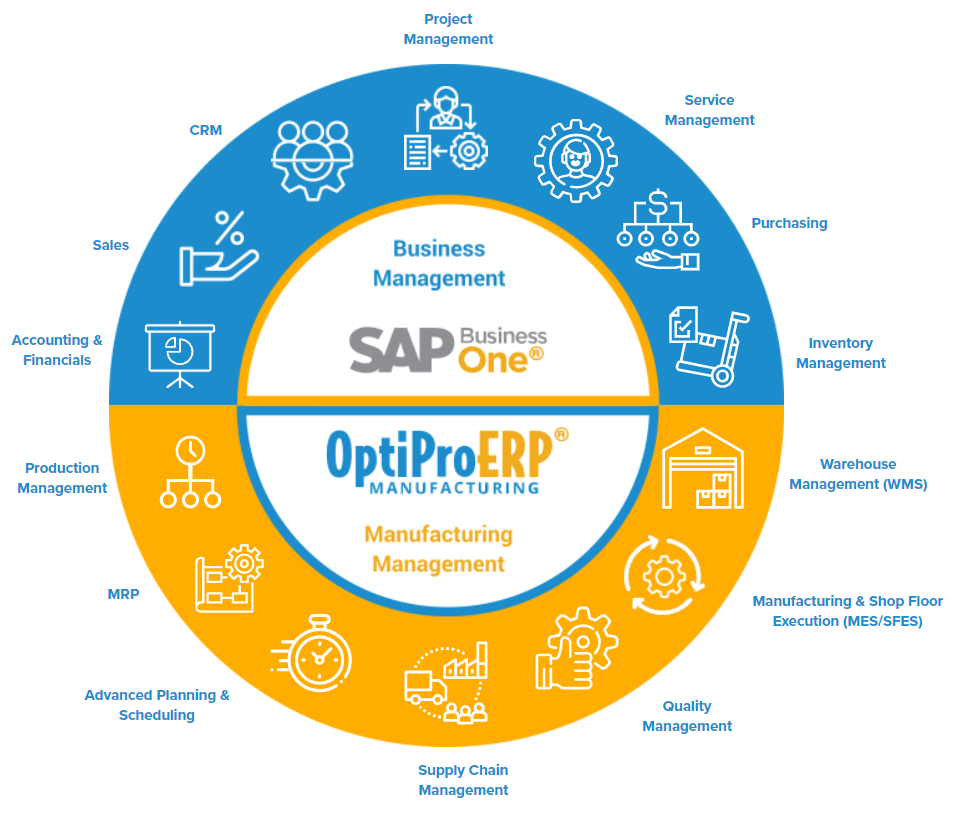
How OptiPro Manufacturing Integrates WMS, ERP, and MES for End-to-End Control?
Modern manufacturers need a standalone system that provides end-to-end control and helps companies gain complete visibility across inventory, production, and warehouse operations. To achieve this visibility, OptiPro Manufacturing WMS software helps manufacturers deliver greater operational value by integrating the combined capabilities of Warehouse Management System (WMS), Enterprise Resource Planning (ERP), and Manufacturing Execution System (MES) into a unified manufacturing ecosystem.
End-to-End Integration
ERP provides planning and resource allocation capabilities, MES supports execution and real-time production activities, while WMS helps manage inventory flow and warehouse operations efficiently.
Inventory accuracy can improve to nearly 95–99% as stock discrepancies are reduced and full traceability is maintained from raw materials to finished goods. Production efficiency also improves significantly because MES helps reduce machine downtime and monitor performance, ERP aligns production with demand forecasting, and WMS ensures timely material availability. Together, these systems can result in a 10–20% increase in Overall Equipment Effectiveness (OEE) and create a smoother production flow.
Order fulfilment also becomes much faster. Orders processed through ERP are produced on time through MES, while advanced WMS capabilities optimize picking, packing, and shipping operations, leading to a 30–50% reduction in order cycle time.
The overall impact of implementing an integrated WMS, ERP, and MES environment is the creation of a connected and intelligent manufacturing ecosystem that improves accuracy, transparency, and responsiveness. This ultimately helps manufacturers and distributors achieve sustainable competitive advantage.



The role of WMS as the Operational Connector
In a traditional setup:
- ERP primarily manages business transactions and planning.
- MES handles shop floor production activities.
- Warehouse operations often remain disconnected from both systems.
This setup leads to several operational inefficiencies, such as:
- No real-time inventory updates
- Lack of visibility in material availability
- Limited or non-existent digital reporting
- Stock mismatches between production and warehouse operations
The OptiPro Manufacturing WMS module eliminates these barriers and limitations by integrating directly with MES and ERP through its advanced warehouse management capabilities. The WMS module adds an additional operational layer on top of MES and ERP that helps synchronize:
- Real-time inventory movements
- Material consumption, stock availability, and demand requirements
- Production transaction updates on the shop floor
- Serial and batch traceability
- Communication between production and warehouse operations
- Finished goods receipt processes
Business Impact
The advanced WMS integrated with ERP helped achieve the expected results by:
- Improving overall operational efficiency across all warehouse centers while maintaining full compliance
- Reducing errors by automating manual workflows, which also lowered operational costs related to labor dependency and inaccuracies
- Significantly increasing production throughput as interconnected systems streamlined operations, improved visibility across processes, and enabled better decision-making
- Enhancing customer satisfaction by responding faster to supply and demand requirements while maximizing ROI from existing ERP investments
Main Insights
It was a strategic transformation initiative for the Fortune 500 discrete manufacturer rather than just a technological upgrade. The integration of WMS with ERP helped eliminate operational hurdles, inaccuracies, and process bottlenecks while significantly improving overall accuracy by aligning production with warehouse operations. It also played a major role in enabling better decision-making. As a result, a fully synchronized manufacturing ecosystem was established that effectively supported evolving supply chain needs and demand.
Which Specific Industries Does OptiProERP WMS Serve?
OptiProERP’s Warehouse Management System (WMS) primarily focuses on discrete manufacturing industries while also supporting related industries that require structured inventory and warehouse management operations.
Industries Served by OptiProERP
- Discrete Manufacturing
- Machinery & Industrial Equipment
- Automotive & Auto Components
- Spare Parts & Component Manufacturing
- Wholesale & Distribution
- Retail & Order Fulfilment
- Traceability-Driven Industries
Discrete Manufacturing (Core Focus)
OptiProERP WMS is primarily designed for discrete manufacturers managing countable products such as machinery, automotive parts, industrial equipment, and assemblies. The system supports tracking of components, sub-assemblies, and finished goods with barcode, serial, and lot traceability while integrating warehouse operations with production processes to ensure accurate material flow and improved production efficiency.
Machinery, Equipment & Spare Parts
Industries dealing with machinery, industrial equipment, and spare parts benefit from efficient handling of complex and high-value inventory through bin-level and pallet-level tracking. The system also supports inventory transfers, component tracking, and assembly/disassembly operations across warehouse locations.
Wholesale & Distribution
For wholesale and distribution businesses, the WMS supports large-volume inventory movements, goods receipt, deliveries, stock transfers, and efficient pick-pack-ship operations. It also provides multi-warehouse inventory visibility and faster dispatch processes through handheld and PDT devices.
Retail & Order Fulfilment
Retail and order fulfilment businesses benefit from support for sales orders, deliveries, sales returns, goods issue handling, fast picking and packing operations, real-time stock visibility, and barcode scanning integration for accurate warehouse execution.
Traceability-Driven Industries
Industries requiring strict inventory traceability benefit from accurate stock counting, serial and batch tracking, real-time inventory visibility, and faster inventory tracking across warehouse operations.
See OptiPro Manufacturing’s Warehouse Management System in Action
FAQs
What is the difference between WMS and ERP?
A Warehouse Management System (WMS) primarily focuses on warehouse operations such as receiving, picking, packing, shipping, tracking, and detailed bin- and rack-level inventory management. In contrast, an ERP (Enterprise Resource Planning) system manages broader business processes such as finance, sales, procurement, HR, and overall inventory management across the organization.
How does a WMS system improve inventory accuracy and warehouse efficiency for discrete manufacturers?
A WMS system improves inventory accuracy through real-time tracking and RFID/barcode scanning, significantly reducing manual errors. It provides detailed inventory visibility at the bin and location level, ensuring that items are accurately stored, tracked, and counted.
The system also automates putaway processes and optimizes picking routes to improve warehouse efficiency. For discrete manufacturers, a WMS ensures timely material issuance for production operations, helping reduce operational delays and production downtime. Overall, it enhances both operational speed and inventory reliability.
How does a barcode and serial/lot tracking work in a WMS system?
Barcode and serial/lot tracking in a WMS system help track inventory movements in real time during receiving, putaway, picking, packing, and shipping operations. Barcode scanners reduce manual errors and improve inventory accuracy by capturing inventory transactions instantly within the system.
Serial tracking assigns a unique serial number to each individual item for unit-level traceability, whereas lot or batch tracking groups products manufactured or received together for batch-level tracking, expiry management, FIFO/FEFO processing, and product recalls.
Together, barcode, serial, and lot tracking provide real-time inventory visibility, faster warehouse operations, improved traceability, better compliance management, and accurate inventory control.
What are the key benefits of implementing a WMS for manufacturing and distribution businesses?
A Warehouse Management System (WMS) helps significantly improve the accuracy, efficiency, and scalability of manufacturing and distribution businesses. A WMS transforms manual and reactive warehouse operations into automated, data-driven, and efficient processes, helping businesses reduce operational costs, increase inventory accuracy, improve operational speed, and support long-term business growth. It also acts as a core digital backbone that helps improve operational efficiency, support business growth, and strengthen competitiveness in today’s fast-moving supply chain environment.
How does a WMS help discrete manufacturers improve production material flow and order fulfilment?
A WMS system helps discrete manufacturers improve production material flow and order fulfilment by creating a connected, real-time warehouse and inventory management environment. It ensures that the right materials are available at the right time and location, helping prevent production delays and line stoppages.
The WMS also improves internal operational efficiency by optimizing the picking, staging, and movement of materials within the warehouse. It enables faster order fulfilment through automated picking, packing, and shipping processes while providing real-time visibility and operational control across warehouse and production activities.
By improving coordination between inventory, warehouse, production, and sales operations, the WMS helps reduce costs, errors, and lead times while increasing throughput, operational accuracy, and business scalability.
What does OptiProERP WMS integrate with?
The OptiProERP WMS integrated with SAP Business One offers greater operational value by combining warehouse execution and core business management into a single, seamless system.
The SAP system manages business transactions such as sales orders, procurement, finance, and inventory management, whereas the WMS handles physical warehouse operations such as receiving, picking, putaway, packing, and shipping. Together, they provide:
- Real-time inventory synchronization
- Efficient inbound, outbound, and production-related warehouse processes
- Barcode-driven accuracy and warehouse automation
- Improved operational visibility and better decision-making across the business
How Can a small manufacturer benefit from WMS?
A WMS system helps manufacturers gain real-time visibility and better control over inventory while ensuring that materials are always available when needed, thereby reducing stockouts and excess inventory.
It improves production efficiency by helping warehouse teams quickly locate and deliver the right components to the shop floor. Order fulfilment also becomes faster and more accurate, reducing shipment errors and improving customer satisfaction.
Additionally, the WMS helps lower operational costs by reducing manual work, errors, and wasted warehouse space. It also provides better visibility for decision-making and supports business growth without adding operational complexity.
What is Bin Management in WMS?
Bin Management in a Warehouse Management System (WMS) refers to the process of organizing and tracking inventory at a highly granular level within warehouse operations, specifically at the location and bin level.
A bin refers to a specific physical storage location within a warehouse where items are stored, for example: Rack A → Shelf 2 → Bin 5. Bin management controls what is stored, where it is stored, and how inventory moves between different warehouse locations.
Does OptiPro Manufacturing WMS work with SAP Business One?
Yes, OptiPro Manufacturing is seamlessly integrated with SAP Business One and uses it as one of its core platforms while extending its capabilities with advanced manufacturing and warehouse management functionalities. These features work directly on SAP Business One data, eliminating data duplication and disconnected processes.
Through the combined power of OptiPro Manufacturing and SAP Business One, manufacturing, warehouse, inventory, and distribution operations are synchronized within a single integrated system. This tight integration ensures real-time data consistency, seamless production-to-warehouse workflows, and accurate and efficient order fulfillment operations.



See More of OptiPro Manufacturing in Action
eWorkplace Suite of Products and Services

About eWorkplace Manufacturing
eWorkplace, Inc. is a global provider of market-leading industry-specific software and services focused on the manufacturing and distribution industries. Through its innovation and deep industry expertise, eWorkplace delivers industry-focused solutions that address the unique challenges of discrete and process manufacturers and distributors.




Follow & Share



© 2026 OptiProERP® Software
We want to hear from you!
We want to hear from you!

Call Us Now
(949) 340-7262