Manufacturers today need more than financial management and basic inventory control. They need visibility into production capacity, materials, resources, scheduling, shop floor activities, quality, and delivery commitments, all while keeping business information connected.
For discrete manufacturers, this becomes particularly important when operations involve complex bills of materials (BOMs), multiple routing revisions, engineer-to-order requirements, configurable products, production scheduling, and detailed shop floor reporting.
OptiPro Manufacturing, integrated with SAP Business One, combines core ERP capabilities with specialized functionality designed for discrete manufacturing. The result is a connected environment that brings manufacturing planning, production, inventory, quality, and shop floor execution together.
This approach helps manufacturers move from disconnected spreadsheets and siloed processes to a more centralized, data-driven manufacturing operation.

Extending SAP Business One for Discrete Manufacturing
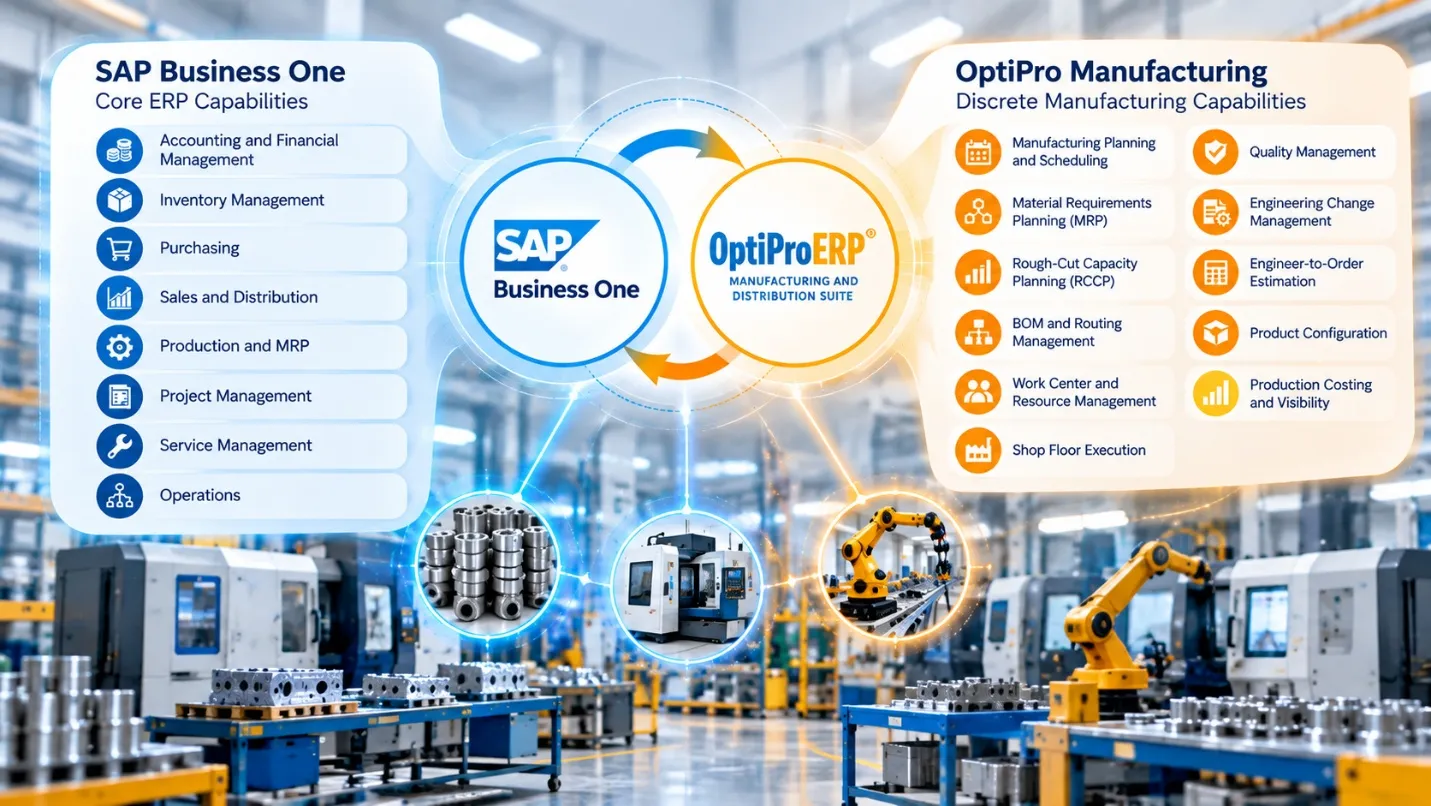
SAP Business One provides a broad ERP foundation covering areas such as accounting, financial management, inventory, purchasing, sales, distribution, production and MRP, project management, service, and operations.
OptiPro Manufacturing extends this foundation with deeper capabilities for discrete manufacturing.
These capabilities include:
- Manufacturing planning and scheduling
- Material Requirements Planning (MRP)
- Rough-Cut Capacity Planning (RCCP)
- BOM and routing management
- Work center and resource management
- Shop floor execution
- Quality management
- Engineering change management
- Engineer-to-order estimation
- Product configuration
- Production costing and visibility
This combination enables manufacturers to connect business processes with detailed production activities within a unified environment.
Addressing Common Manufacturing Challenges
Manufacturing teams regularly need answers to questions such as:
- Do we have enough production capacity to meet demand?
- What materials and resources are required?
- Which BOM or routing revision should be used?
- Can we realistically commit to a customer’s delivery date?
- Which resources are overloaded?
- What is happening on the shop floor?
- Which materials are currently causing production shortages?
Without connected manufacturing data, answering these questions may require pulling information from multiple systems, spreadsheets, or manual processes. A manufacturing ERP system can help bring this information together and provide greater visibility from planning through production.
OptiPro Manufacturing is designed around this connected manufacturing approach, extending SAP Business One beyond core ERP capabilities to support engineering, planning, scheduling, shop floor execution, and quality management.
Manufacturing Planning and Capacity Management
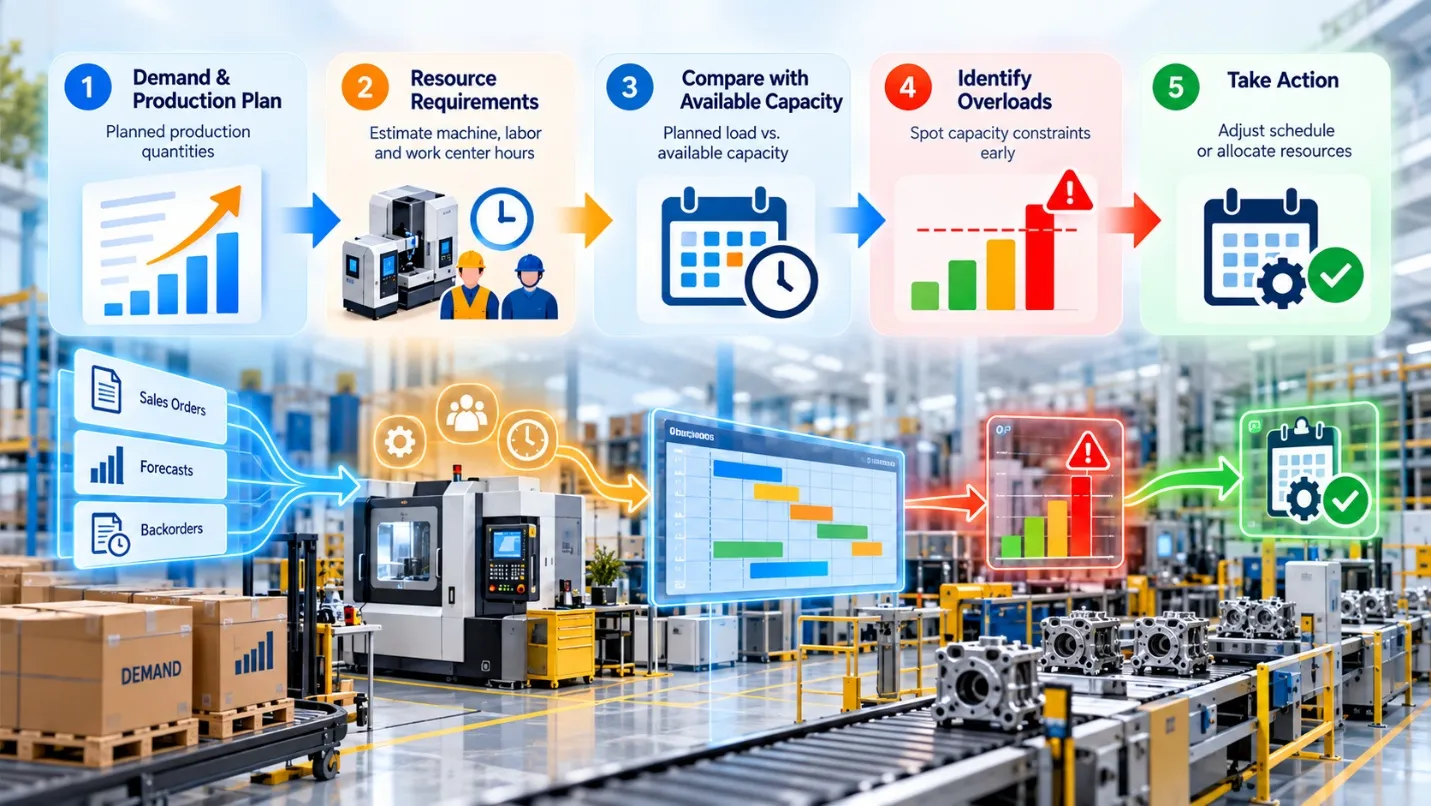
Effective production planning starts with understanding available capacity. OptiPro Manufacturing provides a Work Center Master for defining work centers, operating shifts, working days, start and end times, break periods, labor resources, machines, and production capacity.
Manufacturers can then use this information to evaluate available production capacity and determine whether resources are sufficient to meet demand.
Rough-Cut Capacity Planning (RCCP)
The RCCP capability provides visibility into resource requirements relative to available capacity. For example, if a resource has 510 hours of available capacity but scheduled production requires 960 hours, that resource is overloaded by 450 hours.
Production teams can use this information to identify capacity constraints and make informed scheduling and resource allocation decisions. This provides a structured approach to identifying potential bottlenecks before they affect production.
BOM and Routing Management
BOMs and routings are fundamental to discrete manufacturing.
OptiPro Manufacturing supports multiple BOM and routing revisions and allows these revisions to be defined by company or warehouse. This can be particularly useful for manufacturers operating across multiple facilities or production environments.
Routing information can include:
- Production operations
- Work centers
- Machines and labor
- Standard production times
- Resource costs
For example, a product may move through welding, painting, quality inspection, and final assembly. Each operation can have its own resources and standard production times.
The system also captures actual production information from the shop floor, helping manufacturers compare planned and actual production activities.
Advanced Planning for Demand and Supply
Manufacturing planning requires visibility into both demand and supply.
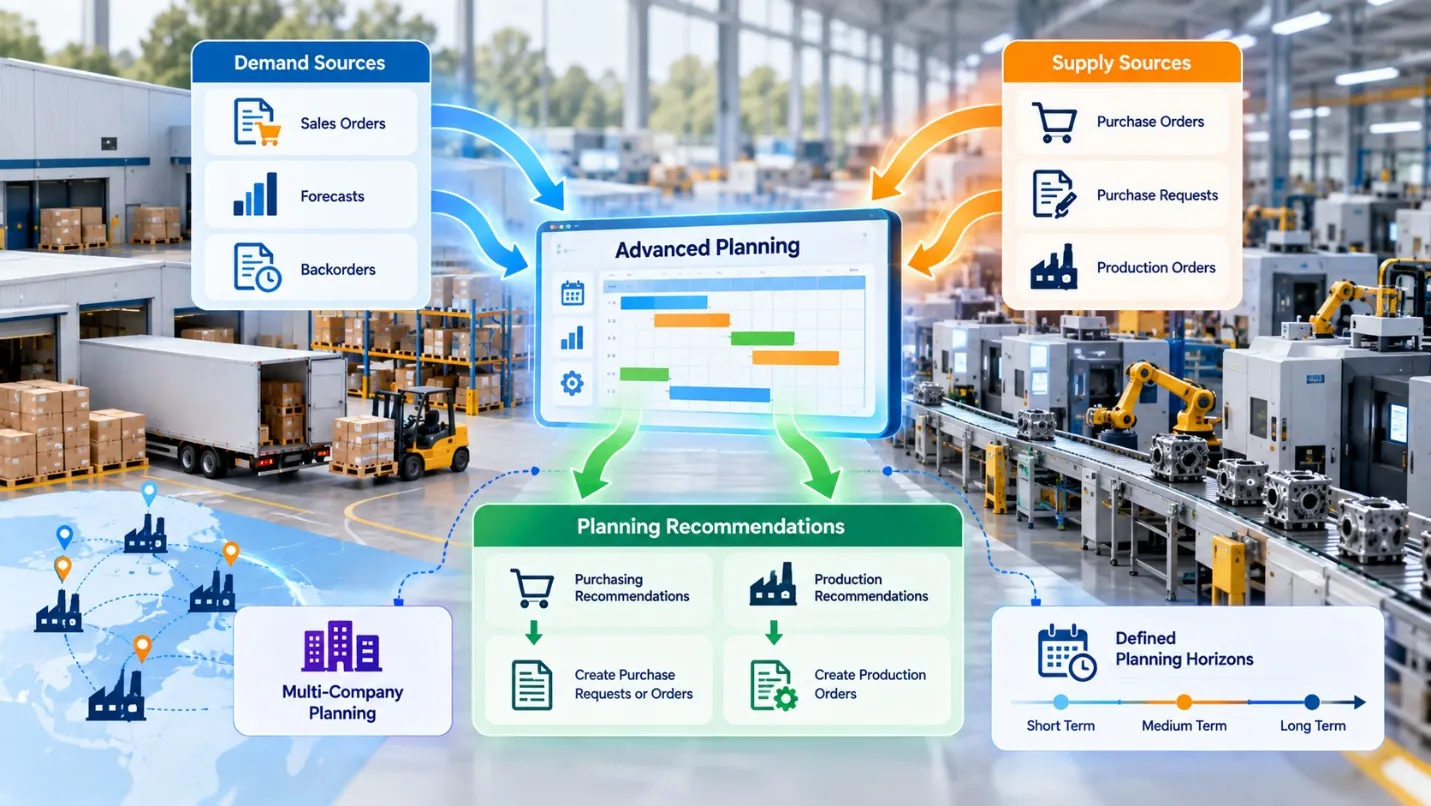
OptiPro Manufacturing’s Advanced Planning & Scheduling (APS) system can consider demand sources such as:
- Sales orders
- Forecasts
- Backorders
Supply sources can include:
- Purchase orders
- Purchase requests
- Production orders
Based on these inputs, the system can generate purchasing and production recommendations.
Purchasing recommendations can be converted into purchase requests or purchase orders, while production recommendations can be converted into production orders.
The planning functionality also supports multi-company planning and defined planning horizons, allowing organizations to structure their planning processes around their operational requirements.
Connecting Production Orders to the Shop Floor
Once production orders are created, manufacturers need to move from planning to execution.
OptiPro Manufacturing supports production order management, scheduling, production order travelers, dispatch lists, and shop floor data collection.
Operations can be scheduled using defined standard times to calculate planned start and end dates.
The Scheduler Workbench provides a graphical view of production schedules. Production managers can review production orders, operations, resources, and dates, and use drag-and-drop functionality to adjust schedules.
This provides a more visual and efficient way to manage production activities and resource requirements.
Real-Time Shop Floor Execution
Shop floor visibility is an important part of manufacturing control.
OptiPro Manufacturing’s shop floor execution system can be accessed through scanner-enabled mobile devices and tablets. Operators can scan production order or dispatch list barcodes to access their assigned activities.
During execution, users can:
- Start production operations
- Capture timestamps
- Report completed quantities
- Record rejected quantities
- Report non-conforming quantities
- Access production instructions and attachments
Attachments can include PDFs, images, Word documents, and CAD drawings, making critical production information available where the work is performed.
This creates a connection between planned production and actual shop floor execution.
Quality Management from Receiving to Production
Quality management can be incorporated into various stages of the manufacturing process.
OptiPro Manufacturing supports quality inspections triggered during activities such as:
- Receiving
- Production
- Shipping
- Ad hoc inspections
Manufacturers can use both 100% inspection and sampling inspection, with support for acceptable quality level (AQL) and rejectable quality level (RQL) criteria.
The Test Data Collection functionality allows quality personnel to record measurements and inspection results and determine whether those results are accepted or rejected.
This provides greater visibility into quality activities as part of the overall manufacturing process.
Engineer-to-Order Estimation and Product Configuration
Not every manufacturing order begins with an existing product and an established BOM.
For engineer-to-order (ETO) and make-to-order (MTO) manufacturers, the ability to estimate and configure products before production begins is critical.
Manufacturing Estimation
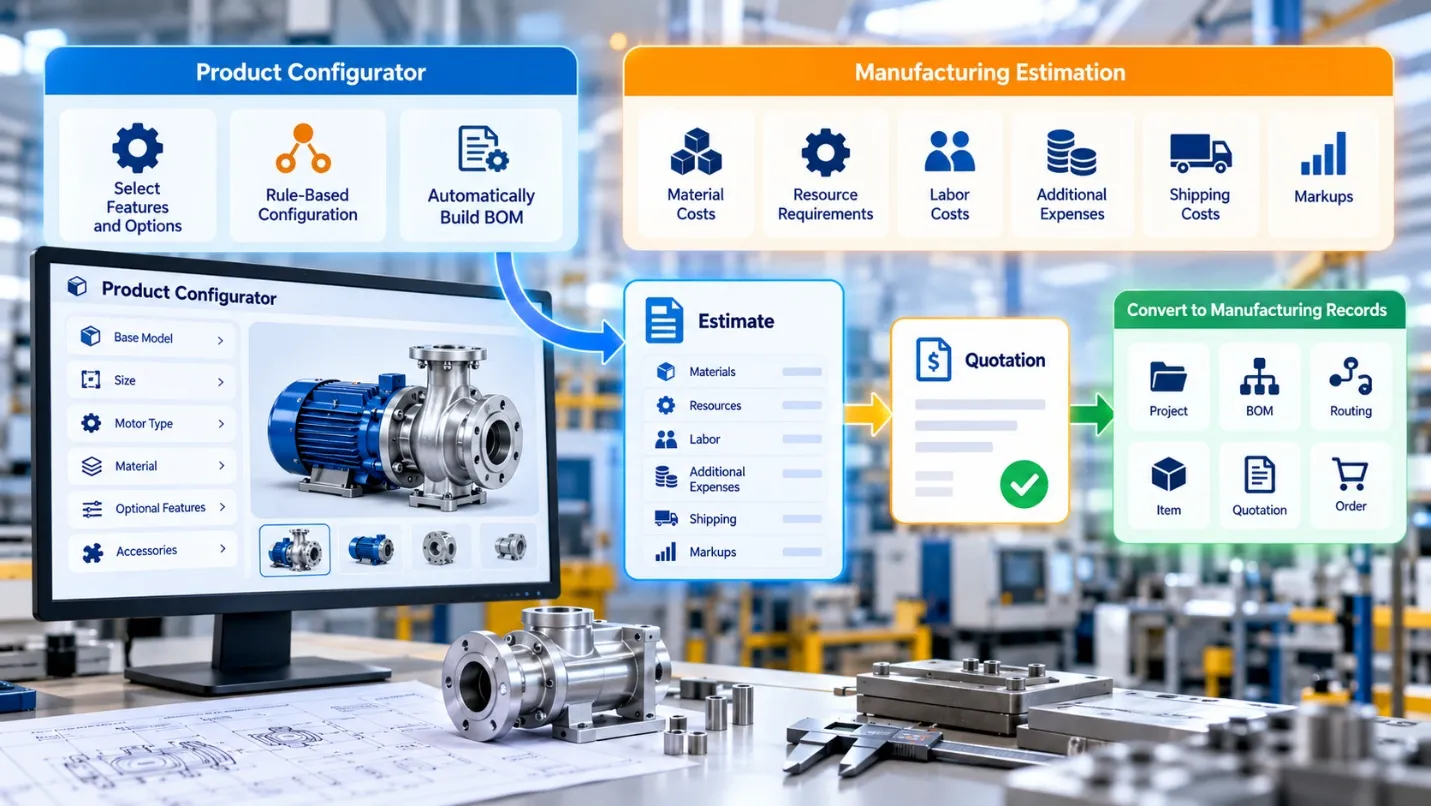
The estimation tool allows manufacturers to calculate material costs, resource requirements, labor costs, additional expenses, shipping costs, and markups when preparing a quotation.
Templates can be used for commonly required materials. Resources can include machinery and labor, along with associated time requirements and hourly rates.
Once the estimate is complete, manufacturers can generate a quotation and upon approval, convert the information into relevant manufacturing records, such as a project, BOM, routing, item, or order.
Product Configurator
The product configurator supports products with multiple features and options.
A rule-based configuration process can control which selections are available based on previous choices. As selections are made, the system can build the corresponding BOM.
If a configuration already exists, the existing item can be used. If it is a new configuration, the system can create a new item and BOM for engineering approval.
This connects product configuration with sales and manufacturing processes.
Supporting Multiple Manufacturing Locations
Manufacturers operating across multiple facilities may need to manage multiple companies, warehouses, and locations.
OptiPro Manufacturing supports these organizational structures. Manufacturing and assembly operations can be managed across different locations and legal entities, depending on the organization’s corporate structure and database configuration.
For example, a manufacturing facility in one country can supply components to an assembly facility in another country while the connected environment provides visibility into the associated operations.
Managing Material Availability and Shortages
Material availability directly affects production schedules.
OptiPro Manufacturing provides inventory management settings such as minimum inventory levels and reorder points, along with a shortage report for production orders.
The shortage report identifies required materials and indicates when those materials are expected to arrive. This allows production teams to consider material availability when planning production activities.
The objective is to provide greater visibility into material requirements without relying solely on manual tracking.
A Connected Manufacturing Environment with SAP Business One
One of the central themes of the OptiPro Manufacturing approach is connecting manufacturing functionality with SAP Business One.
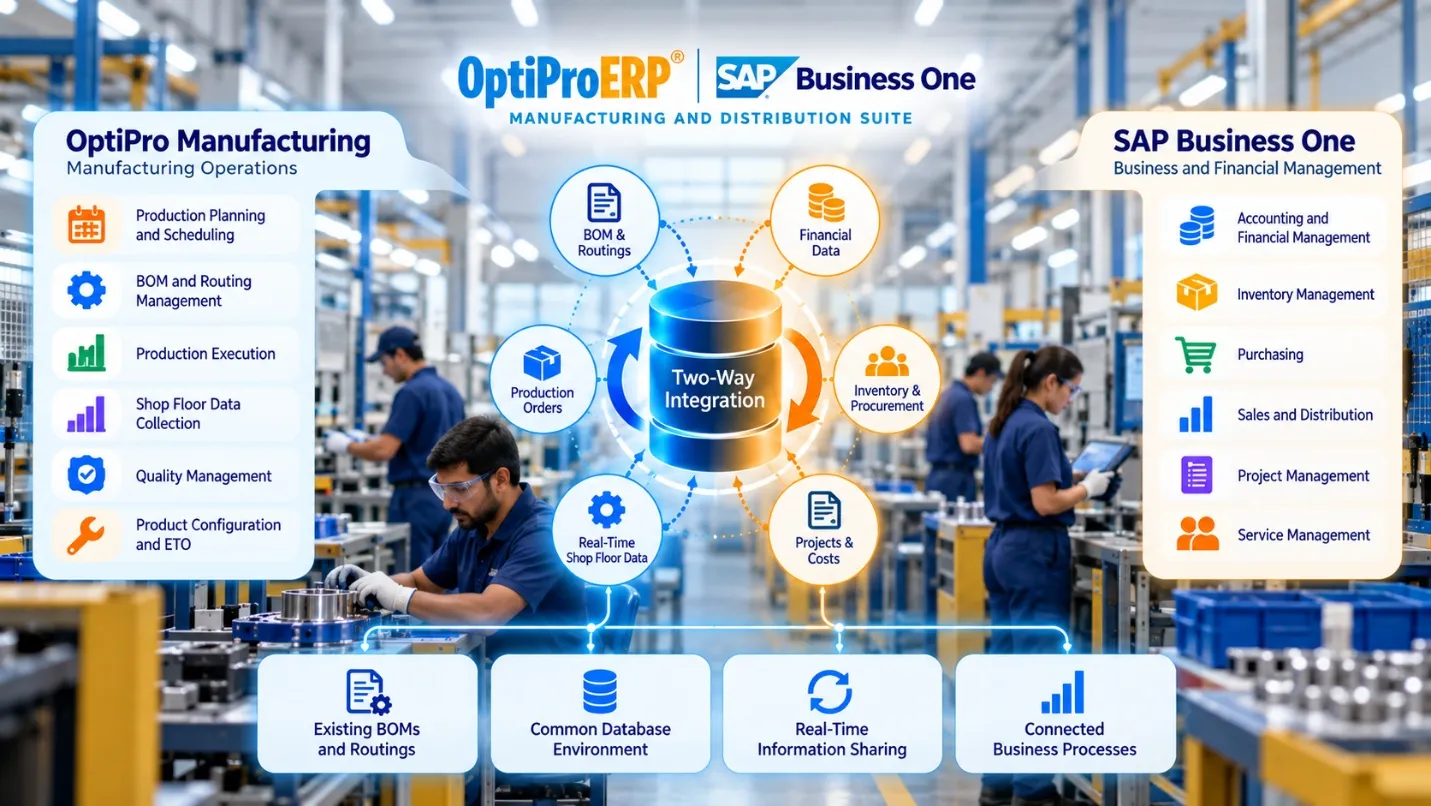
OptiPro Manufacturing and SAP Business One operate through a two-way integration and share a common database environment, making information available across both applications in real time.
For organizations already using SAP Business One, OptiPro Manufacturing can be added to the existing environment. Existing BOMs and routings can be migrated into the OptiPro Manufacturing framework as part of the implementation process.
Financial information continues to be managed within the SAP Business One accounting framework, including the general ledger and transaction determination structure.
Bringing Manufacturing Processes Together
Manufacturing excellence depends on connecting information across the entire production lifecycle.
From estimation and product configuration to BOMs, routings, MRP, capacity planning, scheduling, shop floor execution, quality, and inventory, manufacturers need visibility across the processes that drive production.
OptiPro Manufacturing extends SAP Business One with specialized discrete manufacturing capabilities designed to address these requirements.
For manufacturers looking to connect their ERP and manufacturing processes, this approach provides a foundation for managing production information within a more integrated environment.
Ready to Explore OptiPro Manufacturing?
See how OptiPro Manufacturing, integrated with SAP Business One, can support your manufacturing planning, production, scheduling, shop floor execution, and quality processes.
FAQs
-
What Is OptiPro Manufacturing?
OptiPro Manufacturing is a discrete manufacturing solution integrated with SAP Business One. It extends core ERP capabilities with manufacturing-specific functionality for planning, scheduling, shop floor execution, quality management, estimation, and product configuration.
-
Can OptiPro Manufacturing Be Added to an Existing SAP Business One Environment?
Yes. OptiPro Manufacturing can be added to an existing SAP Business One environment. The solution operates within the same database environment, and existing BOMs and routings can be migrated into the OptiPro Manufacturing framework.
-
What Manufacturing Processes Does OptiPro Manufacturing Support?
OptiPro Manufacturing supports processes including MRP, capacity planning, production scheduling, BOM and routing management, shop floor execution, quality management, engineer-to-order (ETO) estimation, product configuration, and material shortage management.
-
Can OptiPro Manufacturing Support Multiple Manufacturing Locations?
Yes. OptiPro Manufacturing supports multiple companies, warehouses, and manufacturing locations. These operations can function within the same environment and can also support different legal entities and countries, depending on the organization’s structure.
You May Also Like